Apple Orchards Digital Paper: A Seasonal Design Resource for Creators
There is a distinct charm in the autumn season that resonates deeply with designers, crafters, and small business owners. The crisp air, the changing leaves, and the abundance of harvest imagery provide a rich palette for creative expression. At the heart of this seasonal aesthetic lies the Apple Orchards Digital Paper, a versatile resource designed to capture the essence of fall without requiring hours of manual illustration. This collection offers more than just a background; it serves as a foundational element for a wide array of projects, bridging the gap between digital convenience and high-quality physical output.
The Essence of High-Resolution Autumn Imagery
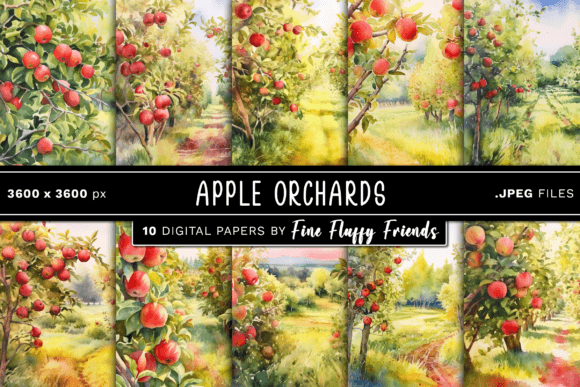
When working on projects intended for print or professional display, resolution is non-negotiable. Many free resources found online suffer from pixelation when enlarged, ruining the final product. The Apple Orchards Digital Paper set addresses this by providing files at a robust 300 DPI (dots per inch). This specification ensures that whether you are printing a single postcard or a large-format banner, the details remain sharp and vibrant. Each image measures 12″ x 12″ at 3600 x 3600 pixels, offering a substantial canvas for layout work.
The inclusion of JPEG format makes these files universally compatible. You do not need specialized software to open them; they integrate seamlessly into standard graphic design suites like Adobe Photoshop, Illustrator, Canva, or even word processing tools. For the user who values efficiency, receiving a single ZIP file containing ten distinct backgrounds simplifies the workflow. Instead of hunting for disparate elements, you have a cohesive suite of designs ready to deploy immediately.
Elevating Print on Demand Businesses
For entrepreneurs operating on platforms like Etsy, Redbubble, or Amazon Merch, the timing of product listings can make or break a sales cycle. The Apple Orchards Digital Paper is particularly valuable for those looking to capitalize on the Q4 holiday rush. Imagine creating a series of greeting cards featuring rustic orchard scenes, perfect for Thanksgiving or early Christmas gifting. With the high-resolution nature of these files, you can upload designs to print-on-demand services knowing that the final printed product will look professional.
Consider the scenario of a shop owner designing custom phone cases or laptop skins. The organic textures and warm tones found in apple orchard themes appeal to a broad demographic. By using these backgrounds as a base layer, you can overlay typography or simple vector icons to create unique, branded merchandise. The consistency across the ten different backgrounds allows for the creation of matching sets—perhaps a family of mugs or a coordinated stationery line—which often encourages higher average order values.
Crafting Physical Memories at Home
Beyond commercial applications, these digital papers find a warm home in personal crafting spaces. Enthusiasts of scrapbooking, card making, and journaling often struggle to find paper stock that matches their specific color schemes. The Apple Orchards Digital Paper solves this by allowing you to print exactly what you need. Whether you are documenting a family trip to an actual orchard or simply preserving memories of a cozy autumn weekend, having a dedicated background streamlines the process.
For those who utilize cutting machines like Silhouette or Cricut, the versatility of these files expands significantly. While the primary format is a digital background, the clean lines and distinct patterns within the orchard imagery can be traced or used as guides for intricate die-cuts. You might use a section of the orchard scene as a backdrop for a layered paper piecing project, adding depth to handmade cards. The 300 DPI quality ensures that even when printed on textured cardstock or watercolor paper, the colors bleed beautifully rather than appearing muddy.
Digital Branding and Social Media Presence
In the digital realm, visual consistency is key to building a recognizable brand. Small businesses, influencers, and content creators often rely on seasonal aesthetics to engage their audience. The Apple Orchards Digital Paper provides a cohesive look for social media campaigns during the fall months. You can resize sections of the 3600 x 3600px images to fit Instagram stories, Pinterest pins, or Facebook headers without losing clarity.
Think about a food blogger launching a new recipe series focused on apple pies or cider. Using one of these backgrounds behind their text overlays creates an immediate thematic connection. Similarly, a local bakery could use these images for promotional graphics announcing their pumpkin spice lattes or harvest specials. The natural, inviting feel of an orchard setting evokes feelings of comfort and nostalgia, which are powerful psychological triggers for engagement and conversion.
Navigating Practical Considerations
While the utility of this resource is vast, there are practical considerations to keep in mind before diving into a project. First, ensure your printer settings match the file's capabilities. To truly benefit from the 300 DPI resolution, your printer should be set to "High Quality" or "Photo" mode, and you should select paper weights that complement the design. Printing a delicate orchard scene on thin copy paper may result in ink bleeding, whereas premium matte or glossy photo paper will enhance the depth of the colors.
Additionally, consider the licensing terms associated with the download. While these files are excellent for personal crafts and many commercial uses, it is always prudent to verify if there are restrictions on reselling the raw files themselves. Typically, digital paper licenses allow you to use the designs in your finished products but prohibit distributing the original JPEGs as a standalone item. Understanding these boundaries protects both the creator and the user.
Another factor is color calibration. Screens often display colors differently than physical printers. If you are aiming for a specific shade of red or green to match existing branding materials, it is wise to print a small test swatch first. The rich hues in the Apple Orchards Digital Paper are generally vibrant, but slight adjustments in your editing software might be necessary to achieve a perfect match with other physical elements in your project.
Finding Inspiration in Every Use Case
The true strength of the Apple Orchards Digital Paper lies in its adaptability. It is not limited to a single industry or hobbyist group. From the graphic designer needing a quick texture for a client presentation to the parent organizing a themed birthday party invitation, the application is boundless. The collection includes variations that range from realistic depictions of trees laden with fruit to more stylized, patterned interpretations, ensuring there is a style to suit every taste.
By integrating these high-quality assets into your workflow, you save time on asset creation and focus more on the creative execution of your vision. Whether you are printing a batch of wedding invitations for a fall ceremony, designing a logo for a new farm-to-table restaurant, or simply decorating your planner for the upcoming season, these backgrounds serve as a reliable starting point. They bring a touch of nature's beauty into your digital and physical creations, proving that sometimes the best inspiration comes from the simplest, most grounded sources.